# About the Using Concrete / Help category
**URL:** https://forums.concretecms.org/t/about-the-using-concrete-help-category/50
**Category:** Using Concrete / Help
**Created:** [April 23, 2021, 12:18am UTC](https://forums.concretecms.org/t/about-the-using-concrete-help-category/50 "2021-04-23T00:18:02Z")
**Posts on this page:** 11
**Page:** 1
### Author:  [@ConcreteCMS](https://forums.concretecms.org/u/ConcreteCMS)
#### Post date: [April 23, 2021, 12:18am UTC](https://forums.concretecms.org/t/about-the-using-concrete-help-category/50/1 "2021-04-23T00:18:02Z")
Check out the [Concrete User’s Guide](https://documentation.concrete5.org/user-guide) here to learn how to use the Concrete CMS. Still have questions? Post them here and work through them with the community.
---
### Author:  [@feeljubilant](https://forums.concretecms.org/u/feeljubilant)
#### Post date: [July 12, 2021, 9:31pm UTC](https://forums.concretecms.org/t/about-the-using-concrete-help-category/50/2 "2021-07-12T21:31:50Z")
I want to prevent the user from being able to use that same login information (username and password) to login a second time using another device. I want to prevent multiple login on multiple devices. How do I do that?
---
### Author:  [@keosotv](https://forums.concretecms.org/u/keosotv)
#### Post date: [July 29, 2021, 3:19pm UTC](https://forums.concretecms.org/t/about-the-using-concrete-help-category/50/3 "2021-07-29T15:19:23Z")
ok. this is very good. i can view fact
---
### Author:  [@boybrown1721](https://forums.concretecms.org/u/boybrown1721)
#### Post date: [August 2, 2021, 9:13pm UTC](https://forums.concretecms.org/t/about-the-using-concrete-help-category/50/4 "2021-08-02T21:13:31Z")
Noob - please help ☹
I am using concrete5 (v 8.6.5 according to my settings) - when I attempted to purchase an add-on my concrete dropdown add-ons box redirected me to the “old” site. So i found the new site, created a project (under [http://www.safetysolutionsaustralia.com.au](http://www.safetysolutionsaustralia.com.au) ) and purchased the app.
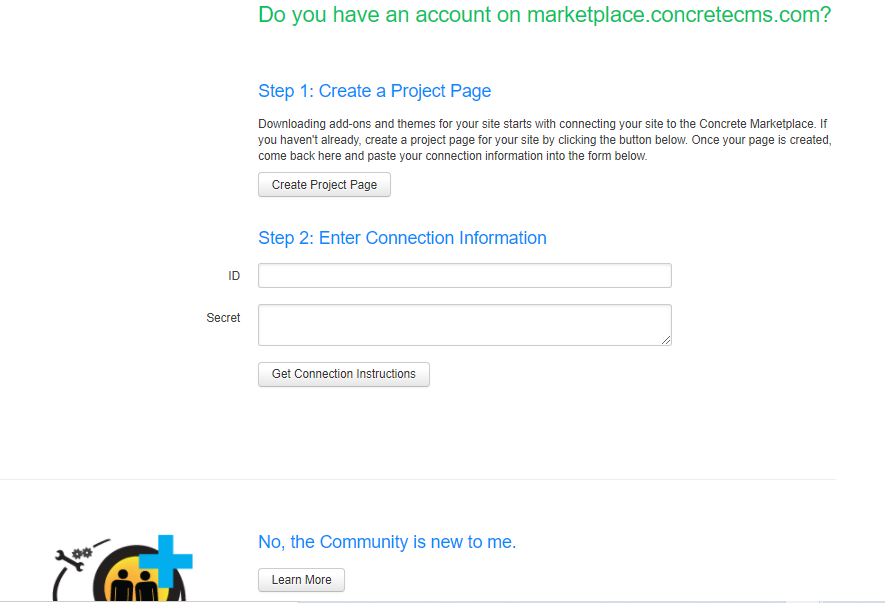
Now when I go back to my add-on’s box in editor mode, and attempt to connect to download/ install the add-on it says i am not connected to the community and have to create a project.
When I put in the ID and SECRET for my existing project it says I have to update my version of concrete5 (but I am working through website login, have no version on my computer, and the web version says i have the latest version).
I have no idea how to link my website with the project i have created in the store, nor how to install the add-on.
Any advice/ assistance would be greatly appreciated.
---
### Author:  [@boybrown1721](https://forums.concretecms.org/u/boybrown1721)
#### Post date: [August 2, 2021, 9:49pm UTC](https://forums.concretecms.org/t/about-the-using-concrete-help-category/50/5 "2021-08-02T21:49:53Z")
FYI - i have accessed the online video on how to link my community account to my hosting account - but in the instructional video it askes for your user ID and password - on mine it asks me to create a project (which i already did) - and now i cant find my ID and SECRET codes to connect (not that it helped last time - said i had to update concrete - despite being on latest version).
v frustrating - any advice appreciated.
---
### Author:  [@boybrown1721](https://forums.concretecms.org/u/boybrown1721)
#### Post date: [August 3, 2021, 3:18am UTC](https://forums.concretecms.org/t/about-the-using-concrete-help-category/50/6 "2021-08-03T03:18:54Z")
HI,
The message i get trying to connect to the community through my ISP is that “you must update your version of concrete to 8.5.6 or higher to connect”.
but my ISP tells me that the latest release version is 8.5.5 - and i can’t find an 8.5.6 release version anywhere…
How can i connect with 8.5.4 (currently installed?) - the add-on i want was developed for a much earlier version, but cant purchase or add-on from the old site now…
I have a zip file (downloaded the app), but have no idea how to get from my computer to my server based concrete development platform - being a novice i am finding this quite difficult to navigate through - not as easy as all of the plug and play tutorials/ videos/ demos!
---
### Author:  [@johncrew](https://forums.concretecms.org/u/johncrew)
#### Post date: [December 8, 2021, 7:40am UTC](https://forums.concretecms.org/t/about-the-using-concrete-help-category/50/8 "2021-12-08T07:40:53Z")
nice information i like this information
---
### Author:  [@kqxs247](https://forums.concretecms.org/u/kqxs247)
#### Post date: [February 16, 2022, 4:10am UTC](https://forums.concretecms.org/t/about-the-using-concrete-help-category/50/9 "2022-02-16T04:10:57Z")
Yeah Yeah yeah yeah Yeah yeah
---
### Author:  [@jisooslotxo](https://forums.concretecms.org/u/jisooslotxo)
#### Post date: [March 15, 2022, 5:05am UTC](https://forums.concretecms.org/t/about-the-using-concrete-help-category/50/10 "2022-03-15T05:05:19Z")
Thank for information
---
### Author:  [@RussellFinneran](https://forums.concretecms.org/u/RussellFinneran)
#### Post date: [July 7, 2022, 8:56am UTC](https://forums.concretecms.org/t/about-the-using-concrete-help-category/50/11 "2022-07-07T08:56:48Z")
I have an issue with a new installation C5 8.5.4
When logged in all hyperlinked text is finding and loading the correct file.
But when logged out users get ‘Download File - Invalid file’ when selecting all linked text through the site, linked images work fine.
This only happened today after adding new user permissions and file manager permissions.
---
### Author:  [@EvanCooper](https://forums.concretecms.org/u/EvanCooper)
#### Post date: [July 14, 2022, 8:41pm UTC](https://forums.concretecms.org/t/about-the-using-concrete-help-category/50/12 "2022-07-14T20:41:42Z")