# Calendar windows without scrollbar
**URL:** https://forums.concretecms.org/t/calendar-windows-without-scrollbar/1056
**Category:** Using Concrete / Help
**Created:** [September 17, 2021, 9:15pm UTC](https://forums.concretecms.org/t/calendar-windows-without-scrollbar/1056 "2021-09-17T21:15:25Z")
**Posts on this page:** 3
**Page:** 1
### Author:  [@jtre](https://forums.concretecms.org/u/jtre)
#### Post date: [September 17, 2021, 9:15pm UTC](https://forums.concretecms.org/t/calendar-windows-without-scrollbar/1056/1 "2021-09-17T21:15:25Z")
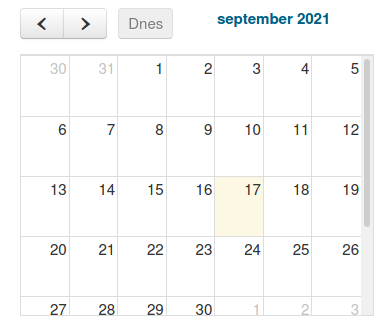
I can not find a solution to a simple problem - when I use the built-in calendar block as monthly view and let it have sufficient width, it doesn’t display the scrollbar on the right size, which is what I want.
However, when I restrict it’s width somehow (by placing it in a narrower column, for example), then the scrollbar appears… (pic.1).
I would like to be able to resize the block width, display the whole month (that means the height should be adjustable or automatically adjusted) and not show the scrollbar.
Also, how is it possible to display current date in the calendar monthly view (preferably near the “Today” button)?
---
### Author:  [@jtre](https://forums.concretecms.org/u/jtre)
#### Post date: [September 20, 2021, 11:51am UTC](https://forums.concretecms.org/t/calendar-windows-without-scrollbar/1056/2 "2021-09-20T11:51:38Z")
I should add, that I searched the site [fullcalendar.io](http://fullcalendar.io) (which the C5 built-in calendar is supposed to be based on). There are certain variables/parameters (like Height, contentHeight etc.) mentioned on that site’s forums, which should make the job.
However, I wasn’t able to find their location in C5 installation. In case someone knows where they are located, I’d be glad to learn that…
Thank you.
---
### Author:  [@jessicadunbar](https://forums.concretecms.org/u/jessicadunbar)
#### Post date: [September 21, 2021, 4:34pm UTC](https://forums.concretecms.org/t/calendar-windows-without-scrollbar/1056/3 "2021-09-21T16:34:20Z")
Hi @jtre
Here’s some basic information on how the overrides work. [Override (almost) any core file in Concrete CMS](https://documentation.concretecms.org/tutorials/override-almost-any-core-file-concrete-cms)
To override find the path of the file you want to override within the concrete directory, and create a file at that same path within your _ **application** _ directory.
For example if you want update your block php you would copy the files to the Application folder:
Core: /concrete/blocks/calendar/view.php
Over to:
Override: /application/blocks/calendar/view.php
Hope that helps