# Concretecms.com nav
**URL:** https://forums.concretecms.org/t/concretecms-com-nav/2384
**Category:** Site Feedback
**Created:** [February 8, 2022, 2:55pm UTC](https://forums.concretecms.org/t/concretecms-com-nav/2384 "2022-02-08T14:55:42Z")
**Posts on this page:** 10
**Page:** 1
### Author:  [@enlil](https://forums.concretecms.org/u/enlil)
#### Post date: [February 8, 2022, 2:55pm UTC](https://forums.concretecms.org/t/concretecms-com-nav/2384/1 "2022-02-08T14:55:42Z")
Having some troubles with the dropdown nav on desktop that I’ve only started noticing the last day or two. When hovering over “community” and wanting to click on forums, the profile dropdown is somehow triggered and you end up clicking on “my profile” rather than “forums”…
Edit: To be more specific, this is happening at [concretecms.com](http://concretecms.com). NOT here in the forums… Anybody else notice this? Still doing it to me after a good number of days.
---
### Author:  [@ConcreteOwl](https://forums.concretecms.org/u/ConcreteOwl)
#### Post date: [February 9, 2022, 8:55pm UTC](https://forums.concretecms.org/t/concretecms-com-nav/2384/2 "2022-02-09T20:55:13Z")
I cannot get the behaviour you are describing to replicate for me, I am using a windows desktop perhaps it could be different on a mac desktop?
---
### Author:  [@linuxoid](https://forums.concretecms.org/u/linuxoid)
#### Post date: [February 10, 2022, 1:35am UTC](https://forums.concretecms.org/t/concretecms-com-nav/2384/3 "2022-02-10T01:35:31Z")
I confirm it happens to me too. When you’re logged in (I mean really logged in after so many times so that you have your avatar shown) and move the mouse pointer towards the Community menu item from the bottom, it pops up the profile drop down menu instead:
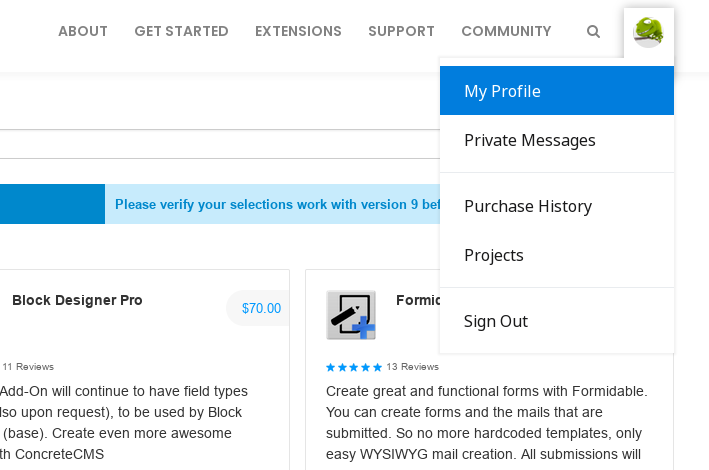
So you have to move the cursor out of that menu and try from a different direction. But then after you have the Community open and move down to the Forum it opens the profile again!
---
### Author:  [@ConcreteOwl](https://forums.concretecms.org/u/ConcreteOwl)
#### Post date: [February 10, 2022, 7:01am UTC](https://forums.concretecms.org/t/concretecms-com-nav/2384/4 "2022-02-10T07:01:26Z")
Yes I confirm that if I move my mouse **slowly** from ‘Community’ to ‘Forums’ the ‘My Profile’ link pops up, But if I move my mouse **quickly** then the ‘Forums’ link pops up.
---
### Author:  [@enlil](https://forums.concretecms.org/u/enlil)
#### Post date: [February 10, 2022, 8:10am UTC](https://forums.concretecms.org/t/concretecms-com-nav/2384/5 "2022-02-10T08:10:28Z")
It’s sporadic at best sometimes the wrong menu will be popping up and you can just click in a different area of the page and then go back to the menu and it works just fine. VERY strange!
---
### Author:  [@ConcreteOwl](https://forums.concretecms.org/u/ConcreteOwl)
#### Post date: [February 10, 2022, 9:17am UTC](https://forums.concretecms.org/t/concretecms-com-nav/2384/6 "2022-02-10T09:17:37Z")
Yeah, if you inspect the:
```auto
.dropdown-menu
```
css element and change:
```auto
padding: .5rem 0;
```
to this
```auto
padding: .2rem 0;
```
it stops that behaviour but you are left with an ugly overflow that I have not been able to work out?
---
### Author:  [@enlil](https://forums.concretecms.org/u/enlil)
#### Post date: [February 15, 2022, 10:05pm UTC](https://forums.concretecms.org/t/concretecms-com-nav/2384/7 "2022-02-15T22:05:14Z")
@Myq @EvanCooper This could use taking a look at. Very annoying and consistently broken!!
---
### Author:  [@enlil](https://forums.concretecms.org/u/enlil)
#### Post date: [February 15, 2022, 10:10pm UTC](https://forums.concretecms.org/t/concretecms-com-nav/2384/8 "2022-02-15T22:10:24Z")
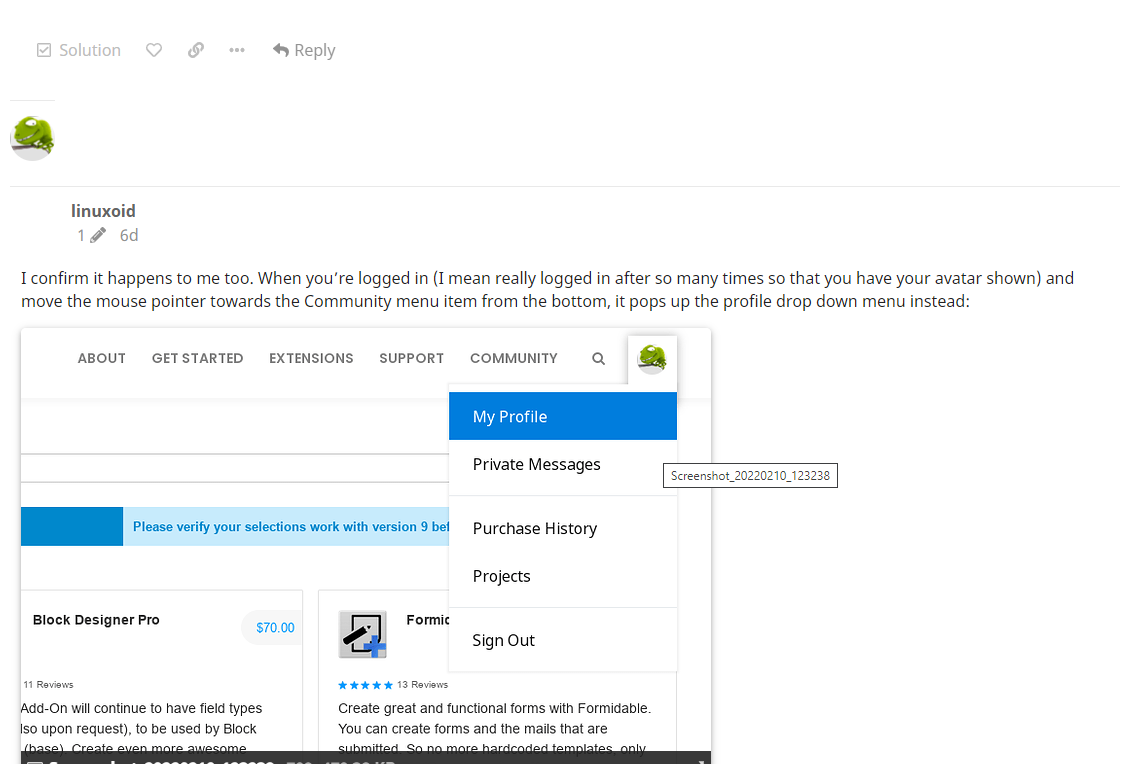
Also seeing lots of glitchyness with the user images lining up with usernames etc in the forums. Scrolling up and down forum pages these image alignments change and glitch a LOT! See attached image of this thread…
---
### Author:  [@EvanCooper](https://forums.concretecms.org/u/EvanCooper)
#### Post date: [February 19, 2022, 1:50am UTC](https://forums.concretecms.org/t/concretecms-com-nav/2384/9 "2022-02-19T01:50:17Z")
I see it - it looks like if you hover slowly you can hit a zone where you can activate the profile menu if you linger long enough. I’ve added this to our queue. Thanks for the report!
---
### Author:  [@EvanCooper](https://forums.concretecms.org/u/EvanCooper)
#### Post date: [February 19, 2022, 1:58am UTC](https://forums.concretecms.org/t/concretecms-com-nav/2384/10 "2022-02-19T01:58:21Z")
I can recreate that too - I will get a ticket in for that. Thanks!