# Express entry edit form: low text contrast in CKEditor text areas when using dark mode
**URL:** https://forums.concretecms.org/t/express-entry-edit-form-low-text-contrast-in-ckeditor-text-areas-when-using-dark-mode/10075
**Category:** Using Concrete / Help
**Tags:** ckeditor
**Created:** [October 8, 2026, 7:10am UTC](https://forums.concretecms.org/t/express-entry-edit-form-low-text-contrast-in-ckeditor-text-areas-when-using-dark-mode/10075 "2026-10-08T07:10:23Z")
**Posts on this page:** 3
**Page:** 1
### Author:  [@tacktack](https://forums.concretecms.org/u/tacktack)
#### Post date: [October 8, 2026, 7:10am UTC](https://forums.concretecms.org/t/express-entry-edit-form-low-text-contrast-in-ckeditor-text-areas-when-using-dark-mode/10075/1 "2026-10-08T07:10:23Z")
Hi everyone,
I’m running into a readability issue in the dashboard when using the dark mode (Concrete CMS 9).
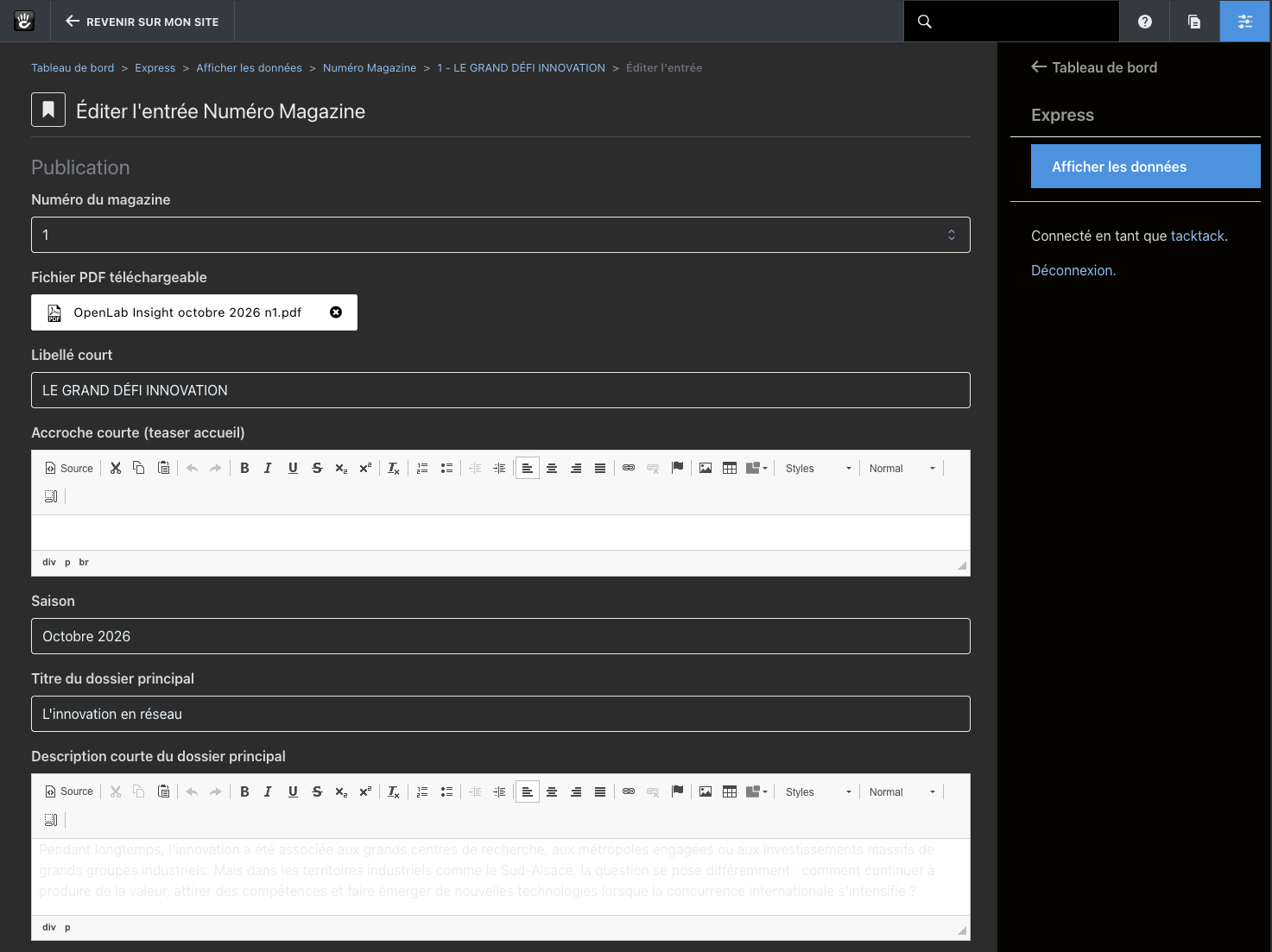
Dashboard \> Express \> View Data \> [Entity] \> Edit entry. This applies to the rich text fields (Express “Text Area” attribute with the CKEditor).
In dark mode, the editor area keeps a white background, but the text inside is rendered in a very light grey. As a result, the content is almost unreadable (see the screenshot: the text in “Description courte du dossier principal” is barely visible against the white background). Plain text inputs in the same form are fine.
---
### Author:  [@mlocati](https://forums.concretecms.org/u/mlocati)
#### Post date: [October 8, 2026, 9:37pm UTC](https://forums.concretecms.org/t/express-entry-edit-form-low-text-contrast-in-ckeditor-text-areas-when-using-dark-mode/10075/2 "2026-10-08T21:37:02Z")
What about using this package?
> **[CKEditor Dark Mode Toggle](https://market.concretecms.com/products/ckeditor-dark-mode-toggle/5dc7c5ad-ca20-11f0-b970-0affd5227f07)**
>
> Adds a Dark Mode Toggle to Rich Text Editor (CKEditor)
---
### Author:  [@tacktack](https://forums.concretecms.org/u/tacktack)
#### Post date: [October 9, 2026, 6:52am UTC](https://forums.concretecms.org/t/express-entry-edit-form-low-text-contrast-in-ckeditor-text-areas-when-using-dark-mode/10075/3 "2026-10-09T06:52:36Z")
Hi,
C’est Formidable 🙂