# How do you require a single number in the password for a user account?
**URL:** https://forums.concretecms.org/t/how-do-you-require-a-single-number-in-the-password-for-a-user-account/6379
**Category:** Using Concrete / Help
**Created:** [October 24, 2023, 6:25pm UTC](https://forums.concretecms.org/t/how-do-you-require-a-single-number-in-the-password-for-a-user-account/6379 "2023-10-24T18:25:25Z")
**Posts on this page:** 8
**Page:** 1
### Author:  [@bmorr75](https://forums.concretecms.org/u/bmorr75)
#### Post date: [October 24, 2023, 6:25pm UTC](https://forums.concretecms.org/t/how-do-you-require-a-single-number-in-the-password-for-a-user-account/6379/1 "2023-10-24T18:25:25Z")
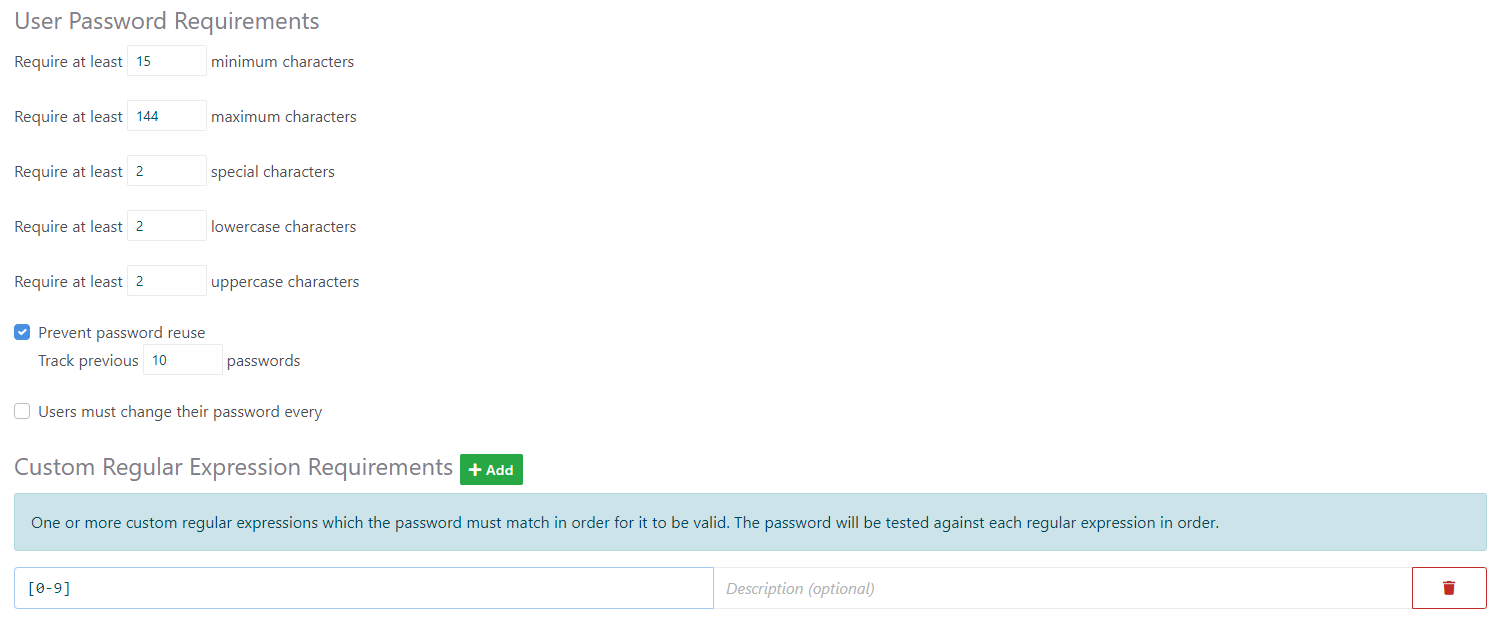
I’m using version 9.2.1 of Concrete. I have tried the following, but I’m certain I’m doing it wrong.
---
### Author:  [@longoj](https://forums.concretecms.org/u/longoj)
#### Post date: [October 24, 2023, 7:37pm UTC](https://forums.concretecms.org/t/how-do-you-require-a-single-number-in-the-password-for-a-user-account/6379/2 "2023-10-24T19:37:29Z")
Hi there
Use regular expressions. For example:
`^(?=(?:[^a-z]*[a-z]){2})(?=(?:[^A-Z]*[A-Z]){2})(?=(?:[^\d]*\d){1})(?=(?:[^\W_]*[\W_]){2})[a-zA-Z\d\W_]{15,144}$`
This regular expression enforces the requirements: at least 2 lowercase letters, at least 2 uppercase letters, at least 2 special characters, and at least 1 number, within a string of 15 to 144 characters. You need to thanks chatgpt 🙂
Just simply tested the requirements outside, not on Concrete.
Also you can add simply this on regular expression with all other parameters on
`.*\d.*`
This regular expression will match any string that contains at least one digit.
JL
---
### Author:  [@bmorr75](https://forums.concretecms.org/u/bmorr75)
#### Post date: [October 24, 2023, 8:43pm UTC](https://forums.concretecms.org/t/how-do-you-require-a-single-number-in-the-password-for-a-user-account/6379/3 "2023-10-24T20:43:44Z")
Thanks for the information. However, I tried both regular expressions you provided and received the following error when trying to save: Invalid custom regex.
---
### Author:  [@longoj](https://forums.concretecms.org/u/longoj)
#### Post date: [October 25, 2023, 5:57am UTC](https://forums.concretecms.org/t/how-do-you-require-a-single-number-in-the-password-for-a-user-account/6379/4 "2023-10-25T05:57:26Z")
Hi
Not sure why, but you need to place the regular expression between delimiters…

Regards
JL
---
### Author:  [@bmorr75](https://forums.concretecms.org/u/bmorr75)
#### Post date: [October 25, 2023, 1:19pm UTC](https://forums.concretecms.org/t/how-do-you-require-a-single-number-in-the-password-for-a-user-account/6379/5 "2023-10-25T13:19:05Z")
While it allowed me to enter the expression, it did not enforce the requirement of at least one numerical value in the password.
---
### Author:  [@longoj](https://forums.concretecms.org/u/longoj)
#### Post date: [October 25, 2023, 2:33pm UTC](https://forums.concretecms.org/t/how-do-you-require-a-single-number-in-the-password-for-a-user-account/6379/6 "2023-10-25T14:33:58Z")


Also same result on profile edit
---
### Author:  [@bmorr75](https://forums.concretecms.org/u/bmorr75)
#### Post date: [October 25, 2023, 3:06pm UTC](https://forums.concretecms.org/t/how-do-you-require-a-single-number-in-the-password-for-a-user-account/6379/7 "2023-10-25T15:06:45Z")
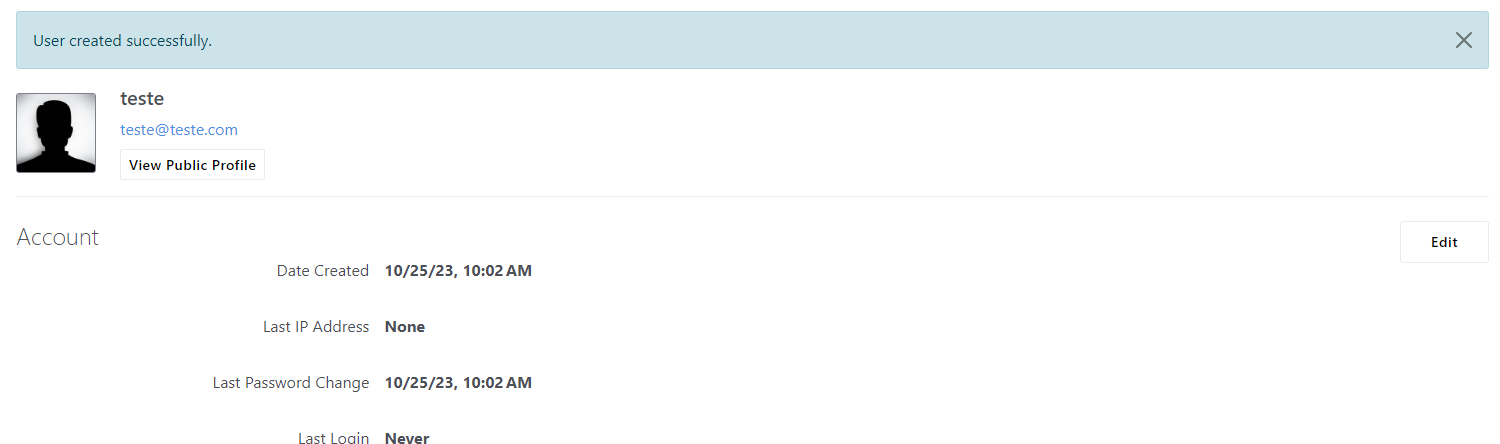
It is allowing me to create an account with no number in the password. Look at my settings below and then the screenshots showing successful creation of an account without a number in the password:


---
### Author:  [@bmorr75](https://forums.concretecms.org/u/bmorr75)
#### Post date: [October 25, 2023, 4:05pm UTC](https://forums.concretecms.org/t/how-do-you-require-a-single-number-in-the-password-for-a-user-account/6379/8 "2023-10-25T16:05:54Z")
I got it working. It turns out the “Description” field for the regular expression must be filled out for it to work even though the field says it is optional. This might be a bug.