# jQuery error when adding image through Composer
**URL:** https://forums.concretecms.org/t/jquery-error-when-adding-image-through-composer/4419
**Category:** Developing with Concrete
**Created:** [November 9, 2022, 9:12pm UTC](https://forums.concretecms.org/t/jquery-error-when-adding-image-through-composer/4419 "2022-11-09T21:12:47Z")
**Posts on this page:** 9
**Page:** 1
### Author:  [@vergedesign](https://forums.concretecms.org/u/vergedesign)
#### Post date: [November 9, 2022, 9:12pm UTC](https://forums.concretecms.org/t/jquery-error-when-adding-image-through-composer/4419/1 "2022-11-09T21:12:47Z")
Hello all,
I am getting a jQuery error when I try to add an image to a custom attribute within Composer. This error only displays while in Composer. When I exit Composer, the image doesn’t show up on the page (broken link), although the Image Title does come up in the alt tag.
I am just starting to build a new site in Concrete 9.1.3, and I am working in a local environment. Hoping someone may have some insight to this problem.
This is the error I get:
```
Error: Syntax error, unrecognized expression: input[name=akID[22][value]]
at se.error (jquery.js?ccm_nocache=738935617e7ace60638f3e74939c82a5b4c45d2f:2:13639)
at se.tokenize (jquery.js?ccm_nocache=738935617e7ace60638f3e74939c82a5b4c45d2f:2:21650)
at se.select (jquery.js?ccm_nocache=738935617e7ace60638f3e74939c82a5b4c45d2f:2:22477)
at Function.se [as find] (jquery.js?ccm_nocache=738935617e7ace60638f3e74939c82a5b4c45d2f:2:7116)
at S.fn.init.find (jquery.js?ccm_nocache=738935617e7ace60638f3e74939c82a5b4c45d2f:2:25047)
at new S.fn.init (jquery.js?ccm_nocache=738935617e7ace60638f3e74939c82a5b4c45d2f:2:25536)
at S (jquery.js?ccm_nocache=738935617e7ace60638f3e74939c82a5b4c45d2f:2:1051)
at a.handler (cms.js?ccm_nocache=738935617e7ace60638f3e74939c82a5b4c45d2f:180:84016)
at Be (vue.js?ccm_nocache=738935617e7ace60638f3e74939c82a5b4c45d2f:6:11394)
at pn.run (vue.js?ccm_nocache=738935617e7ace60638f3e74939c82a5b4c45d2f:6:27888)
```
---
### Author:  [@xb385](https://forums.concretecms.org/u/xb385)
#### Post date: [November 10, 2022, 6:19pm UTC](https://forums.concretecms.org/t/jquery-error-when-adding-image-through-composer/4419/2 "2022-11-10T18:19:04Z")
Are you using a custom theme? maybe somewhere your loading a different jquery version
---
### Author:  [@vergedesign](https://forums.concretecms.org/u/vergedesign)
#### Post date: [November 10, 2022, 8:42pm UTC](https://forums.concretecms.org/t/jquery-error-when-adding-image-through-composer/4419/3 "2022-11-10T20:42:20Z")
Thanks for the reply xb,
I created my own template, but I don’t think it is an issue regarding the wrong version of jQuery, unless v9 uses dramatically different code in the **page\_theme.php** file.
I have developed a number of custom templates in v8, and this issue is something I have never seen before.
---
### Author:  [@EvanCooper](https://forums.concretecms.org/u/EvanCooper)
#### Post date: [November 18, 2022, 1:08am UTC](https://forums.concretecms.org/t/jquery-error-when-adding-image-through-composer/4419/4 "2022-11-18T01:08:51Z")
Hi @vergedesign -
Are you able to recreate this with a fresh demo site? You can spin one up at [Login :: Concrete CMS Community](https://community.concretecms.com/account/hosting)
If so, I would report that here:
> **[Issues · concretecms/concretecms](https://github.com/concretecms/concretecms/issues)**
>
> Official repository for Concrete CMS development. Contribute to concretecms/concretecms development by creating an account on GitHub.
---
### Author:  [@JohntheFish](https://forums.concretecms.org/u/JohntheFish)
#### Post date: [November 18, 2022, 10:18am UTC](https://forums.concretecms.org/t/jquery-error-when-adding-image-through-composer/4419/5 "2022-11-18T10:18:08Z")
> [@vergedesign](#):
>
> `input[name=akID[22][value]]`
When I have encountered problems like this with jQuery selectors, its usually because the parenthesis in the matched string need to be escaped. If already escaped, perhaps the problem is they are being unescaped too soon.
In this case all in “akID[22][value]” need to be escaped. jQuery uses the outer parenthesis as part of the selector syntax, but inside the matched string the parenthesis are part of what is being matched.
---
### Author:  [@vergedesign](https://forums.concretecms.org/u/vergedesign)
#### Post date: [November 21, 2022, 4:43pm UTC](https://forums.concretecms.org/t/jquery-error-when-adding-image-through-composer/4419/6 "2022-11-21T16:43:13Z")
Thank you EC and JtF for your input. I had to step away from the project for a few days, but I am back at it, and I have more info.
First off, I realized that this error was not causing the issue with my image. The issue there was caused by PHP I have used in previous versions of Concrete to display responsive images based on an image attribute. That code is no longer supported in v9 (it is slightly different). Once I made the changes to the code, the image displayed correctly.
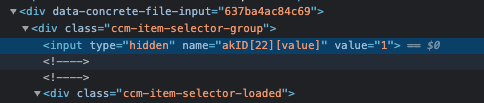
As far as the JS error, I was able to find the input element that is causing the issue. It is a hidden input field with a value of 1 (see first screenshot). This seems to be an issue with the core, as it is being added automatically to my Image/File attribute button within the Composer form. I confirmed this by adding an Image/File attribute to a fresh version of Concrete v9 running the Elemental theme. Once I added an image through the Composer, the same error occurred.
I also added a screen shot of the console with the error.

---
### Author:  [@JohntheFish](https://forums.concretecms.org/u/JohntheFish)
#### Post date: [November 21, 2022, 4:59pm UTC](https://forums.concretecms.org/t/jquery-error-when-adding-image-through-composer/4419/7 "2022-11-21T16:59:57Z")
I agree this looks like it could be a core issue. Please post your notes above as a new Issue on GitHub.
---
### Author:  [@EvanCooper](https://forums.concretecms.org/u/EvanCooper)
#### Post date: [November 22, 2022, 1:04am UTC](https://forums.concretecms.org/t/jquery-error-when-adding-image-through-composer/4419/8 "2022-11-22T01:04:36Z")
Yeah seems like it also interferes with the composer panel flying out when you create a new page?
But definitely when you try to add the image to the image attribute it throws that error.
Thanks for reporting @vergedesign I will throw a bug report badge your way. 👍
---
### Author:  [@stephendmalloy](https://forums.concretecms.org/u/stephendmalloy)
#### Post date: [March 10, 2023, 9:18pm UTC](https://forums.concretecms.org/t/jquery-error-when-adding-image-through-composer/4419/9 "2023-03-10T21:18:22Z")
I’m having the same issue but with building a custom block where a user can add one or more images using multiple file selectors. This obviously doesn’t fix your problem, but I believe it’s a core issue. If you have a look at the “Image Slider” block you can see the way they handle dynamic images (with file manager support) much differently than just using the file manager class to render an image selector component.