# Using Topics as Blog Categories - I must be missing something
**URL:** https://forums.concretecms.org/t/using-topics-as-blog-categories-i-must-be-missing-something/7451
**Category:** Using Concrete / Help
**Created:** [May 21, 2024, 2:23am UTC](https://forums.concretecms.org/t/using-topics-as-blog-categories-i-must-be-missing-something/7451 "2024-05-21T02:23:45Z")
**Posts on this page:** 5
**Page:** 1
### Author:  [@alcopros](https://forums.concretecms.org/u/alcopros)
#### Post date: [May 21, 2024, 2:23am UTC](https://forums.concretecms.org/t/using-topics-as-blog-categories-i-must-be-missing-something/7451/1 "2024-05-21T02:23:45Z")
I’m using Concrete 9.2.9 and attempting to build a site with a blog included.
My Problem:
When I use the “Topics List” block to generate a list of the categories I have setup for my blog, it generates links such as the following which do not link to my actual blog category pages:
[https://luxaquatica.com/blog/topic/21/maintenance-made-easy](https://luxaquatica.com/blog/topic/21/maintenance-made-easy)
I have found no way to modify the topic URL to correspond with the correct location of the blog category page.
My Use Case:
I have setup my “blog category” page intentionally so that it is directly under the “blog” section:
> **[Easy Aquarium Maintenance Tips & Solutions | LuxAquatica](https://luxaquatica.com/blog/maintenance-made-easy)**
>
> Unlock the secrets to stress-free aquarium maintenance with LuxAquatica. Discover expert advice, time-saving tips, and innovative solutions for keeping your aquatic ecosystem pristine without the
That way blog posts in that category will live directly under that category URL as well.
This seems logical to me, and I don’t understand how the existing Topic feature could be used for a proper blog. I’m assuming someone has managed to build a functioning blog with ConcreteCMS and I’m just overlooking the correct solution.
Anyone have any ideas about how to properly use the Topic feature for a blog?
I considered looking in the database to find where the topic URL is stored and just manually edit it there, but that seems a bit hacky and I figured it would be better to ask here first.
Thanks for your time!
---
### Author:  [@alcopros](https://forums.concretecms.org/u/alcopros)
#### Post date: [May 21, 2024, 3:38am UTC](https://forums.concretecms.org/t/using-topics-as-blog-categories-i-must-be-missing-something/7451/2 "2024-05-21T03:38:03Z")
Okay, I sorted it out.
Instead of using the “Topics List” block, I used the “Pages List” block and just selected the options required to display the title of the blog category pages. Fortunately, I created a separate page type I called “Blog Category Page” which made it very easy to only select those pages to be displayed.
That leaves me wondering what good Topics are anyway. I’m still new to Concrete so I’m sure they’ve got some use case, but I am struggling to see what they’re good for, even after reading the docs.
If anyone can fill in my knowlege gaps, I’d appreciate it. Otherwise I’ll try to remember to post back here if I figure it out later on.
---
### Author:  [@cmerritt](https://forums.concretecms.org/u/cmerritt)
#### Post date: [May 21, 2024, 3:55am UTC](https://forums.concretecms.org/t/using-topics-as-blog-categories-i-must-be-missing-something/7451/3 "2024-05-21T03:55:47Z")
Hi,
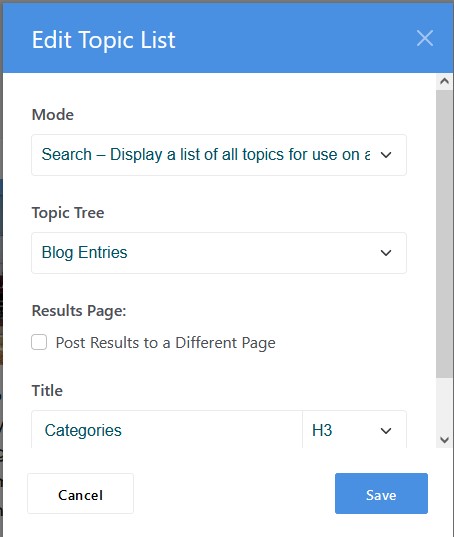
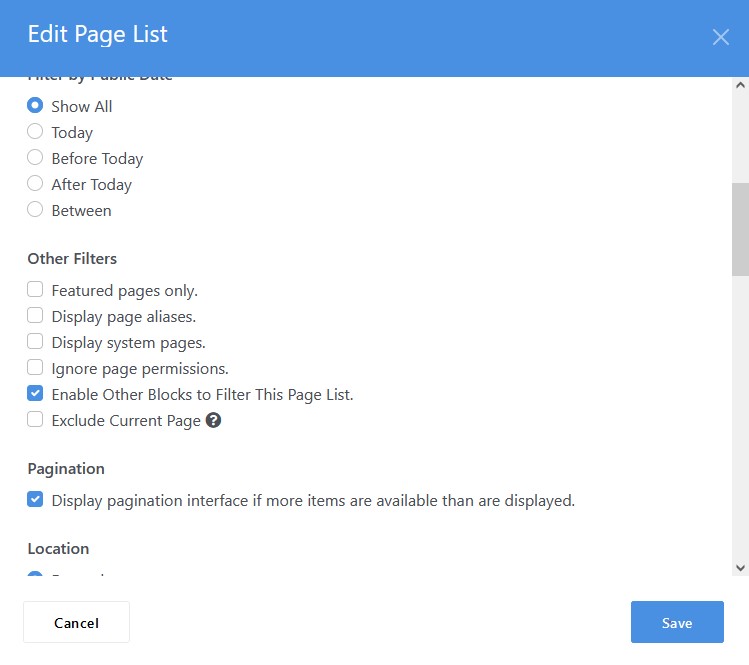
The topic list block can be used in conjunction with the page list block to filter results on the page.
Add the page list block to the page as per screen shot.
Then set the page list as per this
Colin
---
### Author:  [@mhawke](https://forums.concretecms.org/u/mhawke)
#### Post date: [May 26, 2024, 12:46am UTC](https://forums.concretecms.org/t/using-topics-as-blog-categories-i-must-be-missing-something/7451/4 "2024-05-26T00:46:43Z")
I’m glad you found a work-around but I believe the Topics are somewhat broken at the moment. Feel free to add your thoughts.
[Filtering Page List via Topic List block not working · Issue #12038 · concretecms/concretecms · GitHub](https://github.com/concretecms/concretecms/issues/12038)
---
### Author:  [@alcopros](https://forums.concretecms.org/u/alcopros)
#### Post date: [May 26, 2024, 2:35am UTC](https://forums.concretecms.org/t/using-topics-as-blog-categories-i-must-be-missing-something/7451/5 "2024-05-26T02:35:49Z")
Thanks for pointing that out!
I think that has been the main contributor to my confusion about it’s use case. I think I understand how it works now. I might try it out on the next site I build with Concrete assuming it is fixed by then.