Change background color of Ckeditor window when in edit mode?

We’re using Ckeditor for text boxes an pages with dark background. Our team find it hard to apply the predefined styles, e.g. white textcolor. Since the background of Ckeditor is white, it is not possible to see or edit the text.

Can the background temporarely change when in edit mode?
I don’t know Ckeditor that well, but I think it should be possible.

That would be a great help.

Thanks.

Do you have access to the themes css file? I usually tap into the element class .ccm-edit-mode when I need to work with white text in the rich text editor.

So if you have

.textwhite { color:#fff; }

You can add

.ccm-edit-mode .textwhite { color:#ccc; }

To make the text gray while editing it.

Maybe we could improve Concrete so that also in ckeditor we could have a “toggle background” like we have when editing stacks - see Allow setting white/black background when editing stacks by mlocati · Pull Request #12626 · concretecms/concretecms · GitHub

Way back around version 5.7, experimenting with variable type and dark mode, we had a plugin developed for Ckeditor, toggling dark/bright mode.

darkmode_ckeditor

Perhaps it’s a short term solution for you. We still don’t know the future of Ckeditor.

Thanks everybody for contributions.

@Chrouglas I tried that and it works.

@CoDa_ZRH That extension would be great and would do the job more than I expected.
I couldn’t find that in the marketplace, is it maybe in the old marketplace? And would it run in under v.9?

Extension is old and not in the marketplace. It runs fine with v.8+, but with v.9 it has hiccup, the icon in the toolbar won’t show. I’ll try to make it work and prepare a package.

I updated the plugin and made an installable package for v.9, using https://cdn.jsdelivr.net/npm/feather-icons@4.29.2/dist/icons/moon.svg for the toolbar icon. The standard relative path won’t work. You have to give an absolute path to an icon image somewhere on your server, such as http://mydomain.com/images/darkmode.png or within the Filemanager.

If somebody knows how to fix that I’d love to make it fully workable.

How can I send a ZIP file in this forum?

This seems like it would be suited to the community GitHub - Concrete Community · GitHub . @mlocati is the curator.

The other option is to bundle it up into an installable addon package and submit it to the Concrete Marketplace. Submit Your Add-On To Our Marketplace

1 Like

Thanks a lot for the update.

Yes, I’d love to have it, I’d also pay for.

I also support @JohntheFish’s idea of putting the plugin in the marketplace or the community projects page.

OK great.

It seems that I cannot attach a zip file here. So if you want to use it, you’re welcome. PM me an email adress and I send it to you. It works out of the box.

@mlocati and @Johnthefish:
If the plugin is useful I sure want to publish it in the marketplace or on Github Community Projects. (I think we used to have an account on github)

The plugin should be free.

How do I proceed?

For the marketplace, details are in the link I posted previously. The addon then gets reviewed and if necessary amended, then approved and available through the marketplace system.

The community github has no such review requirements, so is better suited to anything that is experimental or volatile or needs developer level expertise to configure or you want to invite 3rd party support through pulls etc. PM @mlocati for advice on the process.

You can also do both.

@CoDa_ZRH If you have a GitHub account I can create a repository under Concrete Community · GitHub and give you admin access to it.

And of course I can help creating a package for ConcreteCMS.

Is it ok to use the MIT license? (It’s one of the most permissive licenses out there, used by ConcreteCMS too.)

If you can’t (or don’t want to) use GitHub, you can of course send me what you’ve done so far with a private message (you need to be logged in with your Concrete account in order to see the “Send Message” button there).
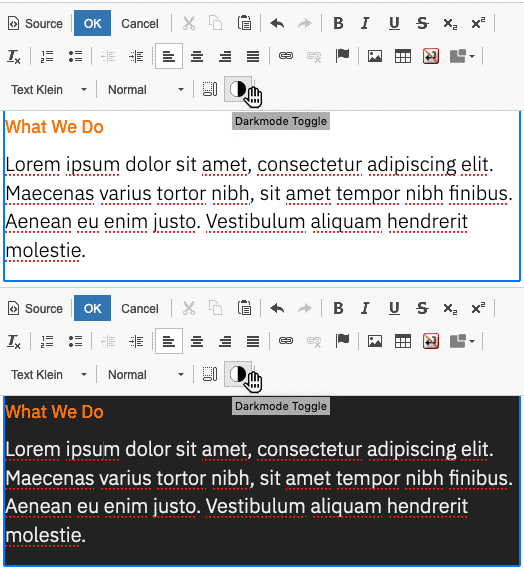
Works just great. It installed perfectly fine and the moon icon shows.
Thanks. Makes it easy to work with.

@CoDa_ZRH kindly gave me the package and allowed me to publish it on GitHub.

You can find it here: GitHub - concrete5-community/dark_mode_editor: A ConcreteCMS package that adds a Dark Mode Toggler to CKEditor

Next steps I’ve planned:

  1. optimize the code
  2. fix the “icon URL” issue
  3. make it compatible with older ConcreteCMS versions
  4. submit it to the ConcreteCMS Marketplace
2 Likes

All done :wink:, let’s wait for the review of the Marketplace managers (thank you guys, you know I love you!)

2 Likes

Really great work for a hopefully useful addon. Thanks @mlocati

@MobineLuxor you might better reload the addon from Github or the Marketplace once it’s ready.

3 Likes

Phantastic! Thank you all!
@CoDa_ZRH I’ll replace the plugin as you said.

The package is now available in the marketplace too - see CKEditor Dark Mode Toggle :: Concrete CMS Marketplace

2 Likes