Thank you for your continued support.
In ConcreteCMS 9.4.8 (Japanese version), a blank page is displayed instead of an error message for non-existent URLs.
Clearing the cache did not resolve the issue.
If the URL ends in a number, a blank page is displayed; if it ends in an English letter, a correct 404 error occurs.
Upon further investigation, “demo.com/blog/1-9999” displays a blank page, while “demo.com/blog/10000-” correctly results in a 404 error.
When I checked the “Settings” → “Location” on the blank page “demo.com/blog/50”, I found that the parent page “demo.com/blog” was displayed.
The strange thing is that the “demo.com/blog” page displayed from “demo.com/blog/50” has a blank space below the header, whereas accessing “demo.com/blog” directly has content below the header.
Both “Location” is “demo.com/blog”, yet one page is blank and the other has content.
Is it possible for the same URL to display differently?
Do you have any error in the logs when you see the blank page?
Check the Concrete dashboard page Reports > Logs, as well as the error log of your web server
When I access “demo.com/1”, “demo.com” is displayed, and when I access “demo.com/a”, it displays “404 Error: Page Not Found. The page you are looking for may not exist or may have been deleted,” which is normal behavior.
“a” is an example.
If you access a non-existent URL like “company” under “demo.com”, you will get a correct 404 error, but if it’s a number, the homepage will be displayed.
The theme is Replica Pro.
I also tested it with the Modena theme, and it correctly returned a 404 error for non-existent URLs, regardless of whether they were letters or numbers.
Thank you.
So it varies depending on the theme?
I didn’t know that.
If it’s due to the theme’s specifications, then there’s nothing I can do, so I’ll accept it.
Sorry for the trouble.
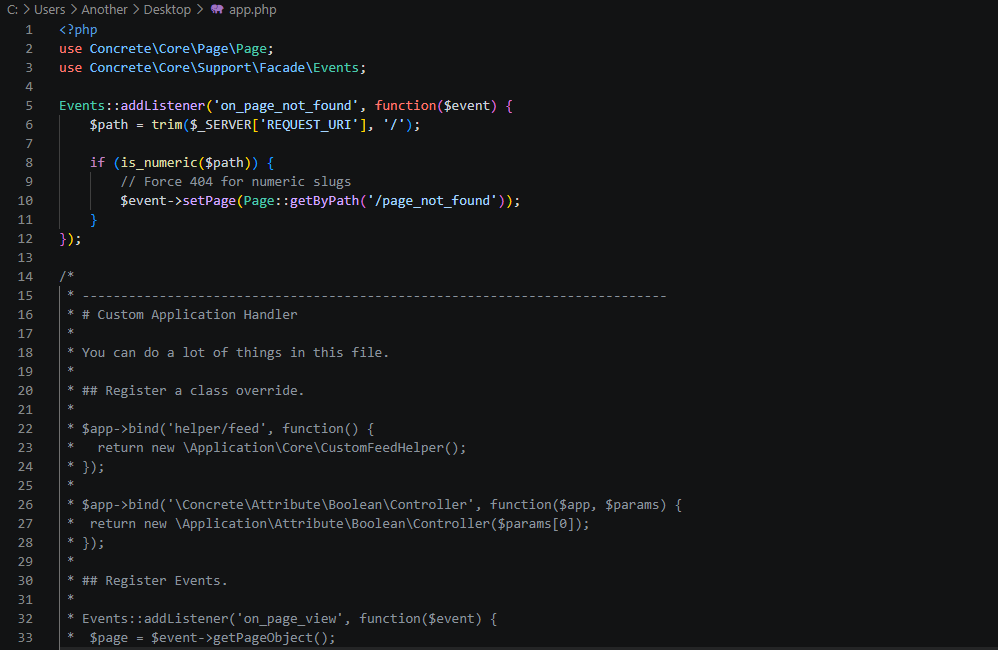
It should be possible to force a 404 for urls with numeric slugs.
The application/bootstrap/app.php would be an ideal candidate for this.
Let me know if you would like to try forcing a 404 for these numeric slugs and I will put a patch together for you to try.
Try this…
Your application/bootstrap/app.php file starts with this
/* @var Concrete\Core\Application\Application $app */
/* @var Concrete\Core\Console\Application $console only set in CLI environment */
Replace those two line of code with this
/* @var Concrete\Core\Application\Application $app */
/* @var Concrete\Core\Console\Application $console only set in CLI environment */

use Concrete\Core\Page\Page;
use Concrete\Core\Support\Facade\Events;

Events::addListener('on_page_not_found', function($event) {
    $path = trim($_SERVER['REQUEST_URI'], '/');

    if (is_numeric($path)) {
        // Force 404 for numeric slugs
        $event->setPage(Page::getByPath('/page_not_found'));
    }
});
Did you clear your cache?
If that does not work it might be necessary to edit the theme files.
Unfortunately I do not have a copy of the theme to test this for you.
So for now, clear the concrete cache and your browser cache.
If you want me to send you a modified app.php file, send a request to my email address - david@deepsea.co.uk