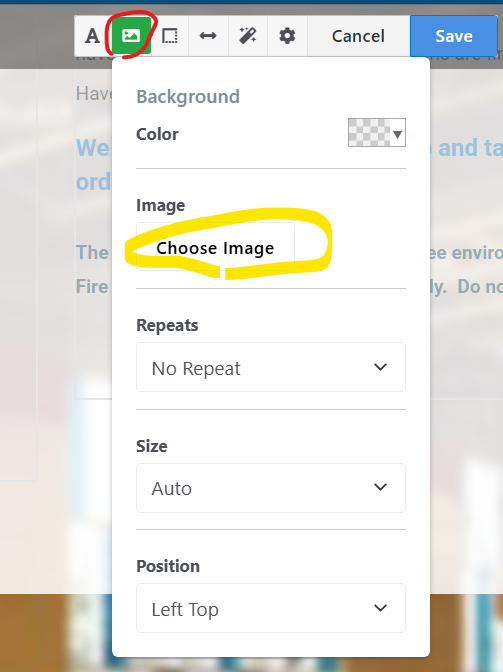
Hi all. I just updated from 9.4.3 to 9.4.7 and I now have a rogue Custom Area Style (background image) being applied to the Main area of seemingly all pages of the same type. I open the Edit Area Design and there is no image set. Any ideas where I might find where this is set? And why it might be populating on multiple page?
Can I just delete the DB reference to the style set in StyleCustomizerInlineStyleSets?
Shot in the dark here. Have you ever had the site on a different theme? I remember years back, a setting applied to a page on an old theme stuck around and affected the new theme. I believe I had to put the page back on the old theme and remove it there and then put the page back on the new theme. Or maybe it was just in a dream. LOL
Thanks for the thought. It is a pretty old install but I don’t think its ever been set up with a different theme.
Its clearly a custom style that my client added but I can’t figure out why it is all of a sudden being applied everywhere. And more importantly, how to get rid of it.
I added a style in the theme’s CSS file that overwrites the area’s custom style so the urgency is kicked down the road. But if anyone has any ideas, it would be nice to clean it up the hack.
Let me take a shot at this. I believe you might have added this rule to main.css
.ccm-custom-style-main {background-image:none}
to clear the blue background. This works but the heart of the problem is that someone has applied a background image to the ‘Main’ area along with some other area-level CSS.
You may know all this but for the sake of others who might pass this way looking for a solution, here are the steps.
In Page Edit mode, click on the ‘Main’ label and choose “Edit area design” then the background icon then clear the background image (or choose one and save and then delete it and save to make sure it sets and then unsets the background image to nothing)
Hope this helps. You could also go to the File Manager and search for ‘Group4.png’ and delete the file altogether but it might be used legitimately in other places so that’s a danger (and your site now reports a 404 on that image so it’s a hack)
Circling back to this… I looked again and there is no background image set for the Main area. Following your suggesition, I set a background, saved, and then removed it but it still has the rogue css. When the new background image was in place, the console showed both the rogue css and the css for the background image i selected. I’m not sure what is going on.
Forgive me if you have already tried this. From area design (as in image above) click (cog) and then [Clear Styles] - red button at the bottom of the dropdown.
There will be other tables that join with the table of styles StyleCustomizerInlineStyleSets that includes the backgroundImageFileID. The joins are deep inside the page versioning system and connect different ways of styling and things that can be styles with versioning. It won’t be a simple deletion of one record.
What you could try relatively safely is to leave the unwanted custom style record in place, but use phpMyAdmin to hack the record so backgroundImageFileID is 0. If that breaks anything, you should be able to hack the FileID back again.
If you have Extreme Clean, you could run it first to reduce the signal to noise ratio for when you are in phpMyAdmin. I don’t think Extreme Clean would fix this, but it may make it easier to work out what is important.
 )
)